
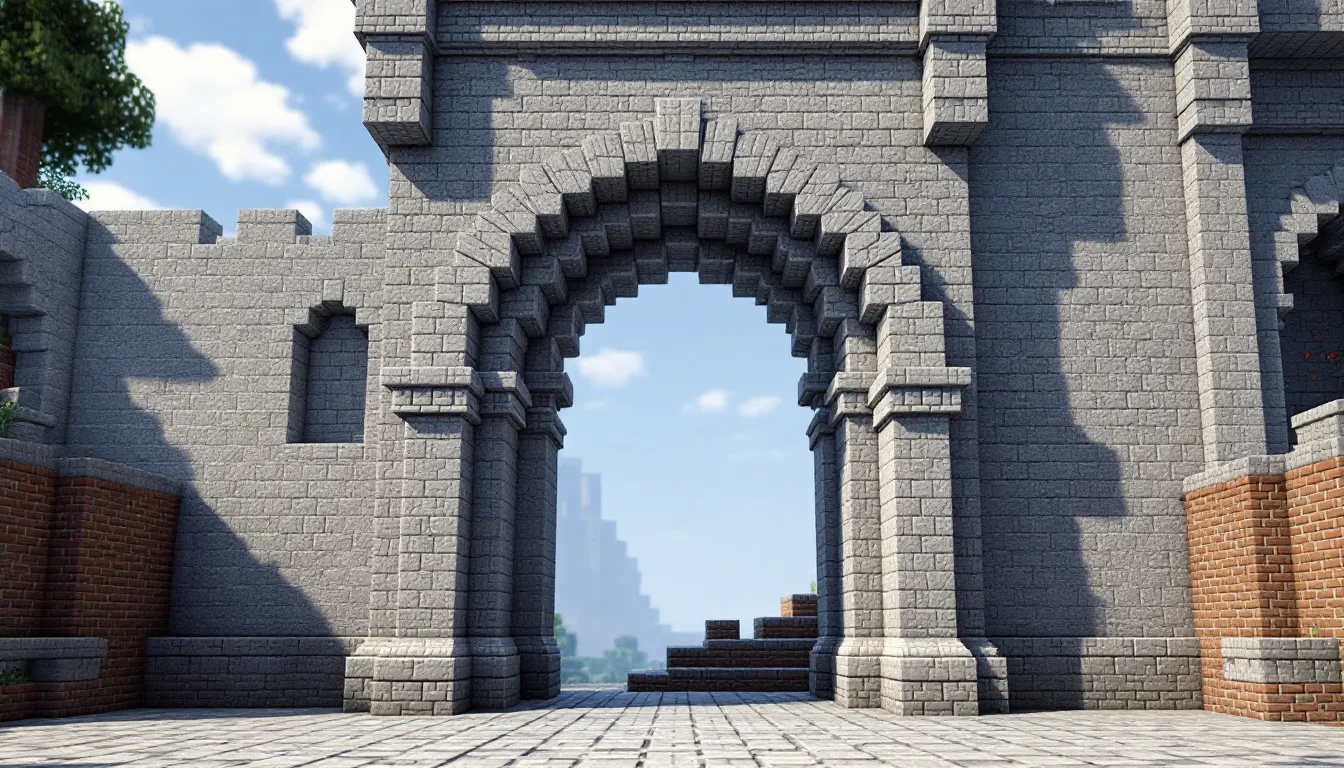
Building arches in Minecraft looks simple until you try it. The blocky nature of the game fights against smooth curves, and without the right approach, you’ll end up with something that looks more like a lumpy doorway than a proper architectural feature. Whether you’re constructing a grand castle entrance, a medieval bridge, or a Roman aqueduct, mastering the arch is essential for taking your builds beyond basic boxes and towers.
This guide breaks down everything you need to know about creating clean, proportional arches at any scale. From the math behind symmetrical curves to specific building techniques for small, medium, and large structures, you’ll learn the methods experienced builders use to make their arches look professional. The techniques work across all platforms, Java Edition on PC, Bedrock on consoles and mobile, and everything in between.
Table of Contents
ToggleKey Takeaways
- Mastering Minecraft arch construction requires understanding circle-based templates and proportional ratios—semicircular (1:1), segmental (3:2 or 2:1), and pointed Gothic (2:1)—to match your architectural style and available space.
- Small arches (3–7 blocks wide) follow a simple formula of moving up 1 block and in 1 block repeatedly, while medium arches (8–15 blocks) benefit from layering depth, voussoir detailing, and strategic stair/slab placement for smoother curves.
- Large Minecraft arches (16+ blocks wide) demand planning with circle generators, temporary scaffolding, center marking, and advanced techniques like compound curves and structural ribbing to ensure symmetry and visual impact.
- Block material choice dramatically affects arch aesthetics: stone bricks for medieval builds, polished blocks for modern styles, and blackstone or deepslate for Gothic designs—always contrast the arch from surrounding walls.
- Avoid common mistakes like off-center keystones, inconsistent depth, weak pillars, and building without templates; match arch style to context and incorporate interior lighting during construction rather than as an afterthought.
- Integrate Minecraft arches into larger structures like castle gateways, bridges, and aqueducts by maintaining proportional spacing (arch width plus 2–4 blocks for support pillars) and using online tools like Plotz Modeller to guarantee accuracy.
Why Arches Matter in Minecraft Building
Arches serve both functional and aesthetic purposes in Minecraft construction. They break up flat walls, create visual interest through curves and depth, and signal architectural sophistication. A well-placed arch transforms a simple doorway into an entrance that feels deliberate and designed.
From a practical standpoint, arches provide structural framing for large openings without requiring constant support columns. They guide the player’s eye upward and create a sense of scale that flat constructions can’t match. In medieval builds, castles, and classical structures, arches are the defining feature that separates amateur builds from detailed recreations.
The psychological impact matters too. Players instinctively recognize the effort required to build proper curves in a block-based game. When someone walks through a perfectly proportioned minecraft archway, they notice the craftsmanship. It’s the difference between a build that looks functional and one that looks intentional.
Mastering minecraft arches also opens doors to more complex architectural elements: vaulted ceilings, flying buttresses, dome construction, and colonnade designs all rely on the same fundamental principles.
Understanding Arch Proportions and Symmetry
The Circle-Based Method Explained
Most successful Minecraft arches start from circle templates. The game’s block grid maps perfectly to pixel circle generators, where each pixel represents one block. The method is straightforward: determine your arch width, generate a circle with that diameter, then use the top half as your building template.
For a 10-block wide opening, you’d generate an 11-block diameter circle (counting the center block), then build only the top arc. The circle generator gives you exact block placement for perfect symmetry. The key is understanding that Minecraft circles are approximations, at smaller sizes, they look angular: at larger sizes, they smooth out.
Here’s how the math works: divide your desired width by 2 to find the radius, then add 1 for the center block if working with odd numbers. For even-width arches, you’ll work with half-blocks conceptually, which translates to alternating stair blocks in practice.
The circle method works for round arches. Pointed arches (Gothic style) and elliptical arches require modified templates, which many online circle generators and modding communities provide as downloadable schematics.
Common Arch Ratios and When to Use Them
Semicircular arch (1:1 ratio): Width equals the diameter of the circle. Classic Roman style, works best for widths between 7-21 blocks. Provides strong visual weight and historical accuracy for classical builds.
Segmental arch (wider than tall): Width is greater than the curve radius. Common ratios are 3:2 or 2:1. These work well for low-profile structures like bridge spans or when ceiling height is limited. They feel more modern and less ornate.
Pointed arch (2:1 height ratio): Height is roughly double the width at the base. Essential for Gothic cathedral builds. Creates dramatic vertical emphasis but requires more building space.
Elliptical arch (variable ratio): Custom ratios for specific aesthetic needs. More complex to calculate but allows precise fitting into existing structures.
Choosing the right ratio depends on three factors: available vertical space, architectural style, and the visual weight you want. Heavy fortress gates look better with semicircular arches. Elegant palace interiors benefit from taller pointed designs.
Building Small Arches (3-7 Blocks Wide)
Step-by-Step Construction Process
Small arches are the foundation of arch building, master these, and larger structures become much easier. Start with a 5-block wide arch as your practice template.
Step 1: Place two vertical pillars 5 blocks apart. Build each pillar to your desired height (typically 4-6 blocks for a 5-block opening).
Step 2: Place single blocks on the inside top corners of each pillar, these form the arch springers (starting points).
Step 3: Add single blocks one level up and one block inward from each springer. The arch is narrowing.
Step 4: Place the keystone (top center block). For a 5-block opening, this sits directly in the middle, 2-3 blocks above the original springer height.
Step 5: Fill any gaps with stairs or slabs if the curve looks too angular. For very small arches (3-block wide), you may only need the two springers and a keystone, three blocks total forming the curve.
The pattern for small arches follows this formula: move up 1 block, move in 1 block, repeat until you reach center. This creates an approximation of a curve that reads clearly even at small scales.
Best Block Choices for Small Arches
Stone bricks remain the default choice for medieval and classical builds. They provide clean lines and the texture doesn’t overwhelm small structures. The variants (mossy, cracked, chiseled) add character without breaking visual continuity.
Cobblestone works for rustic or ancient structures but can look busy at small scales. Use it when you want the arch to feel weathered or rough-hewn.
Polished blocks (polished andesite, polished granite, polished diorite) suit modern or refined builds. The smooth texture helps small arches look cleaner since there’s less visual noise.
Prismarine and quartz excel in underwater or modern builds respectively. Both have subtle texture variations that add interest without clutter.
Avoid blocks with strong directional textures (like wood planks) for the curve itself, they make it harder to read the arch shape. Save those for pillars and supports. For small arches specifically, contrast is your friend: use a different block for the arch curve than the surrounding wall to make the shape pop.
Building Medium Arches (8-15 Blocks Wide)
Creating Depth and Dimension
Medium-sized arches demand more than flat curves, they need depth to look proportional. A single-block-thick arch spanning 12 blocks looks flimsy and unfinished. Building in layers solves this problem and dramatically improves visual impact.
Start with your base arch using the circle method, then add depth by building 2-3 additional layers behind it. Each layer can be identical (simple approach) or progressively smaller (advanced approach). The smaller-layer technique creates a recessed arch that casts shadows and adds architectural detail.
For a 10-block wide arch, consider this layering approach:
- Layer 1 (front face): Full arch curve, decorative block
- Layer 2: Same curve, structural block
- Layer 3: Curve reduced by 1 block on each side, creating a step back
- Layer 4 (optional): Further recessed, creating a deep-set entrance
Voussoir detailing makes medium arches stand out. These are the wedge-shaped blocks that form the arch segments in real architecture. In Minecraft, simulate them by alternating block types in the curve, place a chiseled stone brick every 2-3 blocks among regular stone bricks. This creates visible segments that read as individual arch stones.
Adding archivolt decoration (carved or molded bands around the arch) transforms medium arches from functional to impressive. Build a border around your arch using stairs or slabs in a contrasting color. This frames the opening and adds visual weight.
Using Stairs and Slabs for Smoother Curves
Medium arches are large enough to benefit from stairs and slabs but small enough that you must use them carefully. The goal is smoothing the curve without making it look over-detailed or messy.
Stair placement technique: At transition points where your arch steps inward and upward, replace the full block with a stair block oriented to follow the curve. This cuts the visual angle in half and makes the curve flow better. For a 12-block wide arch, you’ll typically add 4-6 stair blocks total.
Slab smoothing: Where the curve looks particularly angular, add a bottom slab to the underside of the arch block. This extends the curve downward slightly and fills visual gaps. Use this sparingly, 2-3 slabs maximum on medium arches, or it starts looking cluttered.
Upside-down stair trick: Place stairs upside-down at the springer points (where the arch begins its curve). This creates a subtle flare outward that mimics real stone arch construction and improves the transition from vertical pillar to curved arch.
Many builders reference detailed architectural guides when planning decoration patterns for medium arches, since this size range benefits most from real-world design principles translated to blocks.
Building Large Arches (16+ Blocks Wide)
Planning Your Large-Scale Arch
Large minecraft arches require planning before placing a single block. A 20-block wide arch built without a template wastes hours of work and thousands of blocks. The circle generator becomes essential rather than optional at this scale.
Generate your circle template at the exact diameter needed, then display it on a second monitor or print it out. For 16-20 block arches, use a 17-21 diameter circle. For truly massive arches (30+ blocks), you’re working with 31+ diameter circles. Mark the template with coordinate positions if working on a multiplayer server where precision matters.
Material calculation: A 20-block wide arch with 3-block depth and decorative details requires 300-600 blocks depending on complexity. Plan your material gathering accordingly. In survival mode, this means multiple mining trips or established farms.
Scaffold placement: Build temporary scaffolding under the arch path before starting. Use dirt, scaffolding blocks, or wool (easily removed later). This lets you stand at the right height for block placement and see the curve taking shape. For arches above 15 blocks tall, scaffolding is mandatory unless you enjoy constant pillar jumping.
Center marking: Find and mark the exact center point of your arch with a temporary block (use a contrasting color like wool). Every measurement works outward from this point. Being off-center by even one block on a large arch creates visible asymmetry.
Vertical alignment: Large arches look best when the springers (starting points) are at a consistent height. Mark these heights on your support pillars before starting the curve.
Advanced Techniques for Giant Structures
Compound curves: Arches wider than 25 blocks can incorporate compound curves, the curve changes radius partway up. The lower section uses a wider radius for structural appearance, while the upper section tightens for visual interest. This mimics flying buttresses and advanced masonry.
Structural ribbing: Add visible ribs or supports along the arch’s depth. Space them every 3-4 blocks across the width and build them 1-2 blocks deeper than the arch surface. This creates a vaulted appearance and gives the arch visual structure rather than appearing as a flat curve.
Intrados detailing: The intrados (underside of the arch) is visible from below and deserves attention on large builds. Add coffers (recessed panels), cross-vaulting patterns, or decorative blocks to the underside. Use slabs and stairs to create depth variations.
Multiple arch sequences: When building arcades or aqueducts with repeating arches, ensure spacing equals or slightly exceeds arch width. A 20-block wide arch should have 20-25 blocks between arch centers. This ratio feels balanced and allows proper pillar proportions.
World Edit and structure blocks (available in Java Edition and certain servers) can mirror your arch once one side is complete. Build the left half perfectly, then use tools to mirror it. This guarantees symmetry and cuts building time in half. In Bedrock Edition, structure blocks work similarly but with different commands.
For players interested in complex building techniques and architectural mods, several Minecraft communities offer downloadable schematic files for large arch templates.
Different Arch Styles and Architectural Designs
Roman and Classical Arches
Semicircular Roman arch: The defining classical style. Width equals diameter, springers start at pillar tops, and the curve is a perfect half-circle. Use stone bricks, polished granite, or sandstone. Add a keystone at the top using a contrasting block (chiseled stone brick works perfectly).
Characteristics: Heavy, solid proportions with thick pillars (at least 2 blocks wide for every 7 blocks of arch width). Minimal decoration beyond the keystone and perhaps a simple archivolt band.
Best applications: Amphitheaters, aqueducts, triumphal arches, Roman fortress gates, and bathhouse structures.
Decorative elements: Add engaged columns on either side of the arch using pillar blocks (stone brick, quartz, purpur). Place a horizontal beam (architrave) above the arch using slabs to create the entablature.
Gothic Pointed Arches
Lancet arch: Tall and narrow with a pointed top. Height is 2-2.5 times the width. Create it by generating two circles whose edges intersect at the desired width, using only the inner curves that meet at a point.
Characteristics: Vertical emphasis, creates dramatic height, draws the eye upward. Requires significant ceiling space but makes interiors feel vast even if floor space is limited.
Best applications: Cathedral builds, Gothic castles, wizard towers, fantasy structures, and anywhere you want dramatic architectural flair.
Decorative elements: Add tracery (decorative stonework) using iron bars, fences, or carefully placed slabs within the arch opening. Flying buttresses on the exterior using smaller arches connected to the main structure. Use blackstone, dark prismarine, or deepslate for that classic Gothic color palette.
Variations: The equilateral arch (width equals radius of each circle) is less tall than the lancet but still distinctly pointed. The four-centered Tudor arch has a flatter point and works better for wider openings.
Modern and Abstract Arch Designs
Flat arch: Appears nearly horizontal but with slight curvature. Often built with 3-5 degrees of curve across a wide span. Use concrete, polished blocks, or quartz. Works brilliantly for modern builds, minimalist structures, and futuristic designs.
Parabolic arch: Mathematical curve that’s wider at the base and narrows more gradually than a circle. More complex to calculate but creates striking modern aesthetics. Common in modern bridge designs and contemporary architecture.
Abstract curves: Asymmetrical arches, spiral arches, or deliberately distorted proportions. These work in artistic builds where function matters less than visual impact. Use color gradients (concrete blocks in shifting colors) to enhance the abstract nature.
Inverted arch: Flips the typical arch upside-down, creating a suspension effect. Excellent for fantasy builds, floating structures, or defying expectations.
Material choices for modern arches: Concrete (white, light gray, cyan), quartz blocks, prismarine, purpur, and glazed terracotta. Mix smooth and patterned textures for visual interest. Add sea lanterns or glowstone inside the arch depth for integrated lighting.
Essential Tools and Resources for Arch Building
Circle Generator Tools and Templates
Plotz Modeller: The most popular Minecraft circle generator. Offers both horizontal and vertical circles with real-time 3D preview. Input your desired diameter and it generates exact block placement diagrams. Works for circles, ellipses, spheres, and more. Completely free, browser-based, and works on all devices.
Minecraft Circle Generator (donatstudios.com): Simpler interface focused specifically on circles and ovals. Shows filled and hollow versions. Excellent for quick reference when you just need a basic circle template. Displays coordinates for each block.
In-game mods: Several Java Edition mods provide overlay templates directly in-game:
- Schematica: Projects a holographic template of structures directly into your world. Load circle templates and build by following the ghost blocks.
- Litematica: Similar to Schematica but more actively maintained. Works with 1.21+ versions. Includes a material list feature.
- WorldEdit: For creative mode or server operators. Generates perfect circles, ellipses, and arches with single commands. Can also copy, paste, and mirror structures.
Structure blocks: Available in both Java and Bedrock editions without mods. Save one half of your arch, then load and flip it to ensure perfect symmetry. Requires creative mode or operator permissions.
Graph paper method: Old-school but effective. Draw your arch on graph paper where each square equals one block. Especially useful for complex or custom arch shapes that don’t fit standard circle templates.
Creative vs Survival Mode Considerations
Creative mode advantages: Unlimited blocks, instant building, flying for easy positioning, and no fall damage. Use creative for planning and testing arch proportions before committing materials in survival. Build a full-scale mockup, screenshot it, then recreate it in survival with confidence.
Survival mode challenges: Resource gathering takes time, so plan material needs before starting. Building large arches requires scaffolding infrastructure, bring stacks of dirt or craft proper scaffolding blocks. Keep backup materials in nearby chests since mistakes happen.
Hybrid approach: Build your arch design in a creative test world first. Work out proportions, block choices, and decoration. Take screenshots from multiple angles including straight-on for reference. Then gather exact materials needed in your survival world and build it properly.
Multiplayer coordination: Large arches in multiplayer survival benefit from multiple players gathering materials simultaneously. Assign roles: one player mines stone, another gathers fuel for smelting, a third builds scaffolding. This cuts construction time dramatically.
Elytra and rockets: For large or tall arches in survival, elytra makes block placement much faster than pillaring or scaffolding. Combined with firework rockets, you can quickly position yourself at any point on the arch.
Common Mistakes to Avoid When Building Arches
Off-center keystones: The center top block (keystone) must be perfectly centered. On odd-width arches, this is straightforward, one block in the middle. On even-width arches, you’ll have two center blocks. Being off by one block ruins symmetry and is immediately noticeable. Always mark your centerline before starting.
Inconsistent depth: Switching between 1-block and 2-block depth mid-arch looks sloppy. Decide on depth before placing blocks and maintain it throughout. If you want varying depth for decorative effect, plan it deliberately rather than doing it randomly.
Wrong circle size: Using a 10-block diameter circle for an 11-block opening (or vice versa) creates arches that don’t fit properly. Double-check that your circle diameter matches your opening width plus support blocks. For a 10-block clear opening, you need an 11-block diameter circle if building with 1-block supports on each side.
Over-decorating small arches: Adding stairs, slabs, multiple block types, and complex patterns to a 5-block arch creates visual clutter. Small arches need simplicity, clean lines with minimal decoration. Save complex detailing for medium and large arches.
Weak-looking pillars: Arch support pillars that are too thin make the structure look unstable. As a rule, pillar width should be at least 1/5 of the arch width. A 15-block wide arch needs 3-block wide pillars minimum. This ratio creates visual balance and structural believability.
Ignoring context: Building a ornate Gothic pointed arch in a simple cottage or a rough cobblestone arch in a polished modern building creates style mismatch. Match arch style and materials to the surrounding architecture.
No interior support for giant arches: In real architecture, very large arches need additional support structures. Arches wider than 30 blocks benefit from internal supports, cross-bracing, or at minimum decorative elements that suggest structural reinforcement. Purely hollow giant arches look implausible.
Forgetting lighting: Dark arches create shadows and mob spawning opportunities. Plan lighting during construction, not as an afterthought. Recessed lighting in the arch depth, lanterns on pillars, or glowstone incorporated into the arch itself all work.
Building without templates: Eyeballing arches larger than 7 blocks almost always results in asymmetry and wasted blocks. Spend three minutes with a circle generator and save hours of rebuilding.
Incorporating Arches into Larger Builds
Arches in Castles and Fortifications
Gateway arches: The main castle entrance demands an impressive arch, typically 7-11 blocks wide with significant depth (3-5 blocks). Build it recessed into the wall with multiple layers creating a tunnel effect. Add murder holes (gaps in the ceiling) using trapdoors or fence gates in the arch ceiling.
Interior archways: Separate different castle sections (great hall, throne room, barracks) with arches that are slightly smaller than exterior gates, typically 5-7 blocks wide. These can be simpler in decoration since they’re functional dividers rather than defensive features.
Cloister arches: For castle courtyards or monastery builds, create repeating arch sequences along walkways. Space arches 5-7 blocks apart with columns between them. Use slimmer pointed arches (Gothic style) for authenticity.
Arrow slits as inverted arches: Defensive arrow slits use inverted arch curves, wider on the interior, narrowing to a slit on the exterior. Build them between major arches to add functional defensive detailing.
Material choices: Stone bricks (normal, mossy, and cracked mixed together) give appropriate medieval texture. Cobblestone for older or rougher fortifications. Add andesite or diorite accents for contrast.
Arches for Bridges and Aqueducts
Bridge arch fundamentals: The arch span should be proportional to the gap being crossed. For a 20-block wide river, use 18-block arches with 1-block supports on each bank. Build the arch springers at water level or just below, the arch should rise out of the water, not start high above it.
Multiple arch sequences: Long bridges need multiple arches with support pillars in the water. Space arches based on width, a 12-block wide arch should repeat every 14-16 blocks (12 for the span, 2-4 for the support pillar). This creates a rhythmic, proportional appearance.
Aqueduct construction: Build tall support pillars (8-15 blocks high) with arches between them creating an arcade. Stack multiple arch levels for extra height, two or three tiers of arches look spectacular. Top the structure with a water channel (use stone brick slabs for the channel floor with walls 1-2 blocks high).
Underwater supports: For bridge pillars in water, build them wider at the base (use stairs to create a taper). This looks structurally sound and prevents the pillar from looking like it’s floating. Extend the foundation 2-3 blocks wider than the pillar itself.
Decorative elements: Add balustrades (railings) along the bridge deck using fences, walls, or slabs. Place lanterns or torches on posts every 4-5 blocks for lighting. Small decorative arches (3-block wide) can be built into the bridge railing for added visual interest.
Material considerations: Stone brick for formal or Roman-style aqueducts. Cobblestone or andesite for rustic bridges. Sandstone for desert bridges. Prismarine or dark prismarine for underwater sections or oceanic themed bridges.
Conclusion
Mastering minecraft arches transforms basic building into architectural design. The techniques covered here, from circle templates and proportional ratios to material choices and style variations, give you the foundation to construct arches at any scale with confidence.
The progression from small practice arches to massive gateway structures is achievable once you understand the core principles: proper planning, symmetry through templates, appropriate depth and decoration for each size range, and style matching to context. Each arch you build improves your spatial reasoning and block placement precision.
Experiment with different styles based on your build’s theme. Roman semicircular arches for classical structures, Gothic pointed arches for cathedrals and castles, modern flat arches for contemporary builds. Mix techniques, combine compound curves with structural ribbing, add lighting into the arch depth, or create entire arcades with repeating sequences.
The tools and templates mentioned here eliminate the trial-and-error that used to make arch building frustrating. Load up a circle generator, plan your proportions, and build with confidence knowing the math supports the design. Your minecraft arches will stop looking like approximate doorways and start looking like intentional architecture.